<?xml version="1.0" encoding="utf-8"?><feed xmlns="http://www.w3.org/2005/Atom" ><generator uri="https://jekyllrb.com/" version="3.10.0">Jekyll</generator><link href="https://www.diegor.it/feed.xml" rel="self" type="application/atom+xml" /><link href="https://www.diegor.it/" rel="alternate" type="text/html" /><updated>2026-08-27T17:25:10+01:00</updated><id>https://www.diegor.it/feed.xml</id><title type="html">»&amp;gt; import diegor</title><subtitle>just another special module</subtitle><author><name>Diego Russo</name><email>me@diegor.it</email></author><entry><title type="html">Help with COVID-19 research - protein folding on Raspberry Pi4</title><link href="https://www.diegor.it/2020/04/13/help-with-COVID-19-research-protein-folding-on-raspberry-pi4/" rel="alternate" type="text/html" title="Help with COVID-19 research - protein folding on Raspberry Pi4" /><published>2020-04-13T00:00:00+01:00</published><updated>2020-04-13T00:00:00+01:00</updated><id>https://www.diegor.it/2020/04/13/help-with-COVID-19-research-protein-folding-on-raspberry-pi4</id><content type="html" xml:base="https://www.diegor.it/2020/04/13/help-with-COVID-19-research-protein-folding-on-raspberry-pi4/"><![CDATA[<p>Hello, it has been a while since I wrote here last time.</p>

<p>Today I want to share with you something I’ve been doing in the last couple of
days. The lock down measures for COVID-19 and some free time brought me to
tinker a bit with my Raspberry Pi4.</p>

<p>The project <a href="https://boinc.bakerlab.org">Rosetta@home</a> allows people to give
compute power to scientists for designing new proteins. The compute power could
come from any device: a laptop, a desktop, a server and even a portable device.</p>

<p>Recently I bumped into <a href="https://twitter.com/mininodes/status/1246091380507553792">the news of running Rosetta@home on aarch64 (arm64)</a> hardware and,
in my case, on my new and shiny Raspebrry Pi4.</p>

<p>In theory what you need is:</p>
<ul>
  <li>An account on: <a href="https://boinc.bakerlab.org">https://boinc.bakerlab.org</a></li>
  <li>A Raspberry Pi4</li>
  <li>A 64-bit OS</li>
  <li>The BOINC client
    <div class="language-plaintext highlighter-rouge"><div class="highlight"><pre class="highlight"><code>$ sudo apt-get update
$ sudo apt-get install boinc-client boinctui
</code></pre></div>    </div>
  </li>
  <li>The client configure with your email/password</li>
</ul>

<p>A good write-up could be found <a href="https://www.mininodes.com/how-to-run-rosettahome-on-arm-powered-devices/">here</a></p>

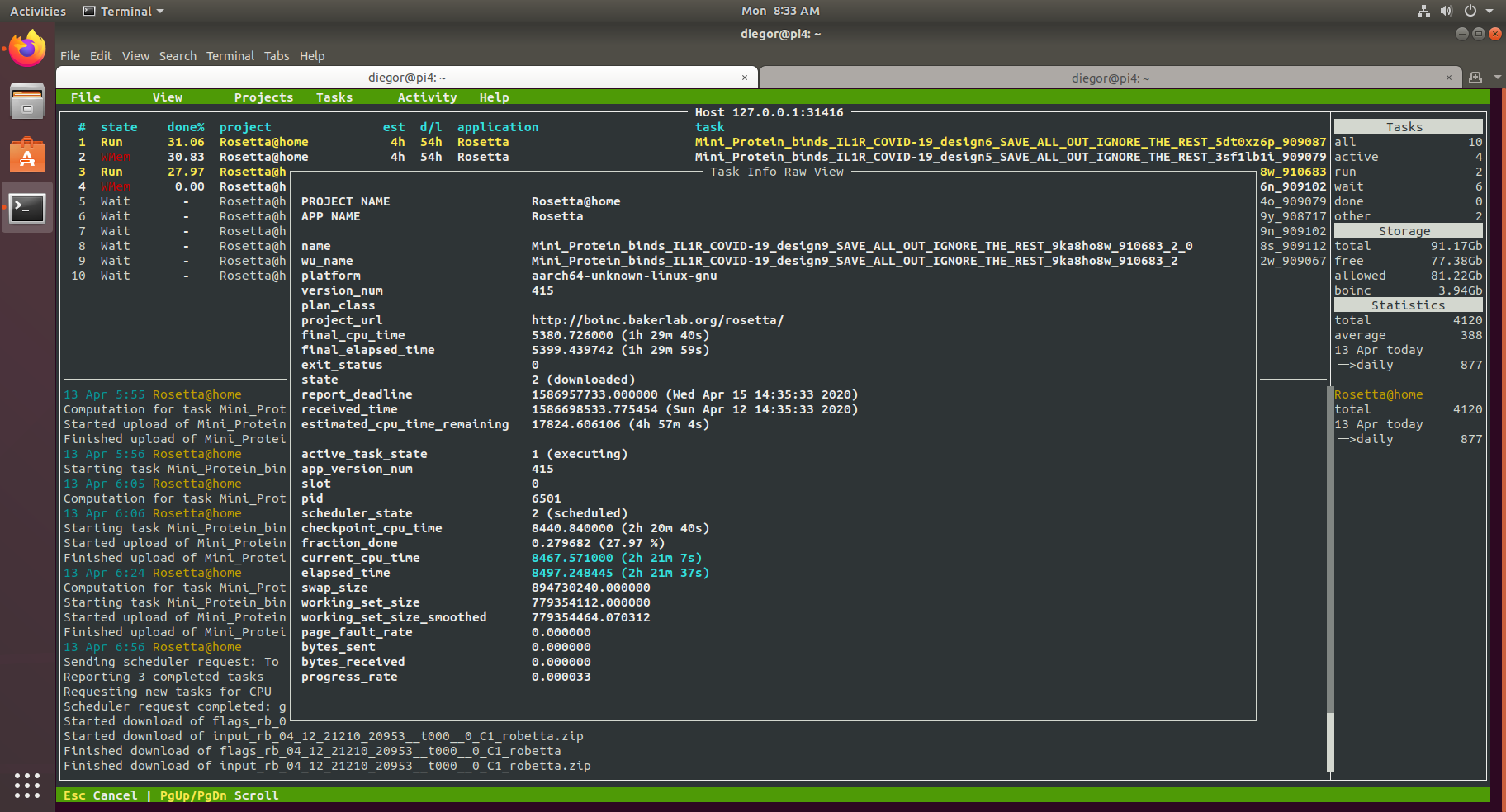
<p><a href="https://www.diegor.it/assets/images/protein_folding_on_rpi4.png"><img src="https://www.diegor.it/assets/images/protein_folding_on_rpi4.png" alt="Protein Folding on Raspberry Pi4" class="align-center" /></a></p>

<p>While I was setting it up I found few <em>“issues”</em>. Hopefully they could save you
some time.</p>

<p><strong>Rosetta doesn’t work on Raspbian</strong><br />
If you own a Raspberry Pi4, I’m sure you’ll have a <a href="https://www.raspberrypi.org/downloads/raspbian/">Raspbian</a> based system. It runs without
any problem but unfortunately it is not suitable for running Rosetta@home.
Although the hardware supports 64-bit, Raspbian is a 32-bit OS and this means
it cannot run 64-bit applications.<br />
<strong>Solution: install a 64-bit distribution.</strong><br />
Ubuntu officially supports Raspberry
Pi4. Download the <strong>64-bit</strong> version from <a href="https://ubuntu.com/download/raspberry-pi">here</a> or follow <a href="https://ubuntu.com/tutorials/how-to-install-ubuntu-on-your-raspberry-pi">this tutorial from
Ubuntu</a>
I had issue with WiFi module hence reverted to wired connection!</p>

<p><strong>The SD card is a bit slow.</strong><br />
Although SD cards nowadays are fast, they are slower than HDD/SDD and when you
run high I/O computations on them, they could fail fairly quick.<br />
<strong>Solution: move the root file system out from the SD card to an external hard
disk.</strong><br />
I had a 1TB portable one and it works like a charm.
It’s not that straightforward to move the root file system to an external disk
but it’s a doable. What you need is a <a href="https://www.tomshardware.com/uk/news/boot-raspberry-pi-from-usb,39782.html">good guide</a></p>

<p><strong>The Pi4 is slow.</strong><br />
Those are <a href="https://www.raspberrypi.org/products/raspberry-pi-4-model-b/specifications/">the specs</a>.
As you can see it has 4 CPUs running at 1.5GHz. Not bad for a small board.<br />
<strong>Solution: overclock the CPU.</strong><br />
Just follow <a href="https://magpi.raspberrypi.org/articles/how-to-overclock-raspberry-pi-4">this tutorial</a>.
I did try to overclock it to 2GHz but it kept power cycling (likely due to
power consumption) so <strong>I stuck with 1.75GHz</strong>.<br />
If you overclock it, I strongly suggest something <strong>to cool down the CPU.</strong>
I have a <a href="https://shop.pimoroni.com/products/fan-shim">Fan SHIM</a>: a bit noisy
but it does the job.</p>

<p><strong>High memory usage</strong><br />
Even I have the 4GB version, I found the Raspberry Pi4 to be very unstable
while doing computations. Memory is somehow limited and when processes use a
large amount of it, the OOM killer could be invoked killing processes that
make the system unstable.<br />
<strong>Solution: create a swapfile</strong><br />
Like any other Linux distribution <a href="https://itsfoss.com/create-swap-file-linux/">create swap space</a> to use part of the hard disk as
<em>“extention”</em> of the memory. I created a 4GB swap file and it seems working OK.</p>]]></content><author><name>Diego Russo</name><email>me@diegor.it</email></author><category term="howto" /><category term="english" /><category term="personal" /><category term="covid19" /><category term="raspberry" /><category term="rosetta" /><summary type="html"><![CDATA[Hello, it has been a while since I wrote here last time.]]></summary></entry><entry><title type="html">The must-read Python’s PEPs</title><link href="https://www.diegor.it/2017/06/15/the-must-read-pythons-peps/" rel="alternate" type="text/html" title="The must-read Python’s PEPs" /><published>2017-06-15T00:00:00+01:00</published><updated>2017-06-15T00:00:00+01:00</updated><id>https://www.diegor.it/2017/06/15/the-must-read-pythons-peps</id><content type="html" xml:base="https://www.diegor.it/2017/06/15/the-must-read-pythons-peps/"><![CDATA[<p>As Python developer, you should know what a PEP is. In case you don’t,</p>
<blockquote>
  <p>“PEP
stands for <strong>Python Enhancement Proposal</strong>. A PEP is a design document
providing information to the Python community, or describing a new feature for
Python or its processes or environment. The PEP should provide a concise
technical specification of the feature and a rationale for the feature”
(from <a href="https://www.python.org/dev/peps/pep-0001/">PEP 1</a>)</p>
</blockquote>

<p>There are three kinds of PEP:</p>
<ul>
  <li>A <strong>Standards Track PEP</strong> describes a new feature or implementation for
Python</li>
  <li>An <strong>Informational PEP</strong> describes a Python design issue, or provides general
guidelines or information to the Python community, but does not propose a new
feature</li>
  <li>A <strong>Process PEP</strong> describes a process surrounding Python, or proposes a
change to (or an event in) a process. Process PEPs are like Standards Track
PEPs but apply to areas other than the Python language itself</li>
</ul>

<p>All PEPs are stored in a <a href="https://github.com/python/peps">github repository</a>
and the list is in the <a href="https://www.python.org/dev/peps/">PEP 0</a></p>

<p>Now, the main question is: “<strong>What are the most important PEPs that a Python
developer should be aware of?</strong>” I went through the long list and I chose the
ones that I think are important to know.</p>

<p>The must know PEPs without witch you cannot be considered a Python programmer
are:</p>
<ul>
  <li><a href="https://www.python.org/dev/peps/pep-0020/">PEP 20 – The Zen of Python</a>:
that’s the first PEP you need to read and apply throughout your Python
development</li>
  <li><a href="https://www.python.org/dev/peps/
pep-0008/">PEP 8 – Style Guide for Python Code</a>: this PEP defines the coding convention when writing Python.
I expect everyone writing PEP8 compliant code</li>
  <li><a href="https://www.python.org/dev/peps/
pep-0257/">PEP 257 – Docstring Conventions</a>: conventions for Docstring in Python</li>
  <li><a href="https://www.python.org/dev/
peps/pep-0257/">PEP 287 – reStructuredText Docstring Format</a>: when plain text is not enough, reStructuredText is the answer
for Docstring</li>
</ul>

<p>The following PEPs don’t fall into any category but it’s good to know their
existence anyway:</p>
<ul>
  <li><a href="https://www.python.org/dev/peps/pep-0007/">PEP 7 – Style Guide for C Code</a>:
if you need to contribute to C implementation of Python, that’s the PEP for
you</li>
  <li><a href="https://www.python.org/dev/peps/
pep-0404/">PEP 404 – Python 2.8 Un-release Schedule</a>: release not found! There will be never a 2.8 Python release.
The last Python 2 release is 2.7. It’s time to move to Python 3!</li>
  <li><a href="https://www.
python.org/dev/peps/pep-0440/">PEP 440 – Version Identification and Dependency Specification</a>: this PEP describes a scheme for identifying
versions of Python software distributions, and declaring dependencies on
particular versions</li>
</ul>

<p>The following PEPs instead will be split between Python versions (2 and 3) and
they just represent an attempt to summarise the most relevant ones in order to
pick peculiarities of the language itself. The version of python affected and
some personal extra comments will be side noted.</p>

<h2 id="python-2">Python 2</h2>
<ul>
  <li><a href="https://www.python.org/dev/
peps/pep-0201/">PEP 201 – Lockstep Iteration (zip function)</a> (2.0) - <em>it’s very handy</em></li>
  <li><a href="https://www.python.org/dev/peps/pep-0202/">PEP 202 – List Comprehensions</a>
(2.0) - <em>one of my favourites</em></li>
  <li><a href="https://www.python.org/dev/peps/pep-0221/">PEP 221 – Import As</a> (2.0)</li>
  <li><a href="https://www.python.org/dev/peps/pep-0234/">PEP 234 – Iterators</a> (2.1) -
<em>trust me, you will use them</em></li>
  <li><a href="https://www.python.org/dev/peps/
pep-0236/">PEP 236 – Back to the __future__</a> (2.1) - <em>do you want to use</em> <code class="language-plaintext highlighter-rouge">print()</code> <em>(from Python 3.X) in Python
2.X? That’s the module for you</em></li>
  <li><a href="https://www.python.org/dev/peps/
pep-0255/">PEP 255 – Simple Generators (yield)</a> (2.2) - <em>once you know it, you’ll love it</em></li>
  <li><a href="https://www.python.org/dev/
peps/pep-0279/">PEP 279 – The enumerate() built-in function</a> (2.3) - <em>sometime it is very useful</em></li>
  <li><a href="https://www.python.org/dev/peps/pep-0282/">PEP 282 – A Logging System</a>
(2.3) - <em>please, don’t debug with</em> <code class="language-plaintext highlighter-rouge">print()</code></li>
  <li><a href="https://www.python.org/dev/peps/pep-0285/">PEP 285 – Adding a bool type</a>
(2.3) - <em>I don’t understand how you live without it!</em></li>
  <li><a href="https://www.python.org/dev/peps/pep-0289/">PEP 289 – Generator Expressions</a>
(2.4) - <em>list comprehensions with generators</em></li>
  <li><a href="https://www.python.org/dev/peps/
pep-0308/">PEP 308 – Conditional Expressions</a> (2.4) - <em>Python “ternary” expression:</em> <code class="language-plaintext highlighter-rouge">X if C else Y</code></li>
  <li><a href="https://www.python.org/dev/
peps/pep-0318/">PEP 318 – Decorators for Functions and Methods</a> (2.4) - <em>@decorators are methods which wrap functions and
methods</em></li>
  <li><a href="https://www.python.org/dev/peps/pep-0322/">PEP 322 – Reverse Iteration</a>
(2.4)</li>
  <li><a href="https://www.python.org/dev/peps/
pep-0324/">PEP 324 – subprocess - New process module</a> (2.4)</li>
  <li><a href="https://www.python.org/dev/peps/pep-0327/">PEP 327 – Decimal Data Type</a>
(2.4) - <em>floatintg point are just too inexact. Period.</em></li>
  <li><a href="https://www.python.org/dev/
peps/pep-0341/">PEP 341 – Unifying try-except and try-finally</a> - <em>Do you know that</em> <code class="language-plaintext highlighter-rouge">try</code> <em>constructs allow an</em> <code class="language-plaintext highlighter-rouge">else</code>
<em>statement?</em></li>
  <li><a href="https://www.python.org/dev/
peps/pep-0342/">PEP 342 – Coroutines via Enhanced Generators</a> (2.5) - <em>still need to get those!</em></li>
  <li><a href="https://www.python.org/dev/peps/
pep-0343/">PEP 343 – The “with” Statement</a> (2.5) - <em>really? Don’t you know it? Shame on you!</em></li>
  <li><a href="https://www.python.org/dev/peps/pep-0367/">PEP 367 – New Super</a> (2.6) -
<em>that’s important, read it!</em></li>
</ul>

<h2 id="python-2-and-3">Python 2 and 3</h2>
<ul>
  <li><a href="https://www.python.org/dev/peps/pep-0274/">PEP 274 – Dict Comprehensions</a>
(originally 2.3, then 2.7 and 3.0) - <em>the beauty of list comprehensions applied
to</em> <code class="language-plaintext highlighter-rouge">Dict</code></li>
  <li><a href="https://
www.python.org/dev/peps/pep-0372/">PEP 372 – Adding an ordered dictionary to collections</a> (2.7, 3.1) - <em>because order matters</em></li>
  <li><a href="https://
www.python.org/dev/peps/pep-0389/">PEP 389 – argparse - New Command Line Parsing Module</a> (2.7, 3.2) - <em>please, stop using optparse
right now!</em></li>
</ul>

<h2 id="python-3">Python 3</h2>
<ul>
  <li><a href="https://www.python.org/dev/peps/pep-0380/">PEP 380 – Syntax for Delegating to a Subgenerator (yield from)</a> (3.3) - <em>a generator to delegate
part of its operations to another generator</em></li>
  <li><a href="https://www.python.org/dev/peps/
pep-0405/">PEP 405 – Python Virtual Environments</a> (3.3) - <em>I’m really glad to see a tighter integration with virtual
environments</em></li>
  <li><a href="https://www.python.org/
dev/peps/pep-0417/">PEP 417 – Including mock in the Standard Library</a> (3.3) - <em>it’s one of the first modules I pip install when
using Python 2.7</em></li>
  <li><a href="https://www.python.org/dev/peps/pep-0435/">PEP 435 – Adding an Enum type to the Python standard library</a> (3.4)</li>
  <li><a href="https://www.python.org/dev/peps/pep-0450/">PEP 450 – Adding A Statistics Module To The Standard Library</a> (3.4) - <em>never used so far, but I
recognise its importance</em></li>
  <li><a href="https://www.python.org/dev/peps/
pep-0483/">PEP 483 - The Theory of Type Hints</a> (3.5) - <em>that’s just a theory for the next PEP</em></li>
  <li><a href="https://www.python.org/dev/peps/pep-0484/">PEP 484 - Type Hints </a> (3.5) -
<em>they are used to easier static analysis and refactoring, potential runtime
type checking, and (perhaps, in some contexts) code generation utilizing type
information. <strong>Python will remain a dynamically typed language, and the authors
have no desire to ever make type hints mandatory, even by convention</strong></em></li>
  <li><a href="https://www.python.org/dev/peps/pep-0485/">PEP 485 – A Function for testing approximate equality</a> (3.5) - <code class="language-plaintext highlighter-rouge">is_close</code> <em>enough</em> :)</li>
  <li><a href="https://www.python.org/dev/peps/pep-0492/">PEP 492 – Coroutines with async and await syntax</a> (3.5) - <em>coroutines start being a
proper concept in Python</em></li>
  <li><a href="https://www.python.org/dev/peps/
pep-0525/">PEP 525 – Asynchronous Generators</a> (3.6) - <em>generators made asynchronous</em></li>
  <li><a href="https://www.python.org/dev/
peps/pep-0526/">PEP 526 – Syntax for Variable Annotations</a> (3.6) - <em>it’s like PEP 484 but for variables</em></li>
  <li><a href="https://www.python.org/dev/peps/
pep-0530/">PEP 530 – Asynchronous Comprehensions</a> (3.6) - <em>things are getting complicated eh… asynchronous versions
of list, set, dict comprehensions and generator expressions</em></li>
  <li><a href="https://www.python.org/dev/peps/pep-3000/">PEP 3000 – Python 3000</a> (3000) -
<em>where 3v3rything begins!</em></li>
  <li><a href="https://www.python.org/dev/peps/
pep-3101/">PEP 3101 – Advanced String Formatting</a> (3.0) - <em>stop using % for string formatting and embrace</em> <code class="language-plaintext highlighter-rouge">.format()</code>
<em>method (included in Python 2.6 as well)</em></li>
  <li><a href="https://www.python.org/dev/peps/
pep-3105/">PEP 3105 – Make print a function</a> (3.0) - <em>I told you not to use</em> <code class="language-plaintext highlighter-rouge">print</code> <em>for debugging! Now all your
Python 2.X needs a huge refactoring for working in Python 3.X. Joking apart,
that’s the most common error when you try to run Python 2.X code using Python
3.X intepreter.</em></li>
  <li><a href="https://www.python.org/dev/peps/pep-3107/">PEP 3107 – Function Annotations</a>
(3.0)</li>
  <li><a href="https://www.python.org/dev/
peps/pep-3109/">PEP 3109 – Raising Exceptions in Python 3000</a> (3.0) - <em>yep, in Python 3.X,</em> <code class="language-plaintext highlighter-rouge">raise</code> <em>changes a bit. It’s worth
having a look</em></li>
  <li><a href="https://www.python.org/dev/
peps/pep-3110/">PEP 3110 – Catching Exceptions in Python 3000</a> (3.0) - <em>see above</em></li>
  <li><a href="https://www.python.org/dev/peps/
pep-3115/">PEP 3115 – Metaclasses in Python 3000</a> (3.0) - <em>well, if you have ever used</em> <code class="language-plaintext highlighter-rouge">__metaclass__</code><em>, Python 3.X
don’t</em></li>
  <li><a href="https://www.python.org/dev/
peps/pep-3119/">PEP 3119 – Introducing Abstract Base Classes</a> (3000) - <code class="language-plaintext highlighter-rouge">abc</code><em>, no I haven’t forgotten the alphabet :)</em></li>
  <li><a href="https://www.python.org/dev/peps/pep-3120/">PEP 3120 – Using UTF-8 as the default source encoding</a> (3.0) - <em>this PEP removes a lot of
headeaches we have in Python 2.X</em></li>
  <li><a href="https://www.python.org/dev/peps/pep-3129/">PEP 3129 – Class Decorators</a>
(3.0) - <em>like PEP 318 but for classes</em></li>
  <li><a href="https://www.python.org/dev/peps/pep-3135/">PEP 3135 – New Super</a> (3.0) -
<em>it’s PEP 367 for Python 3.X</em></li>
  <li><a href="https://www.python.org/dev/peps/pep-3148/">PEP 3148 – futures - execute computations asynchronously</a> (3.2) - <em>The</em> <code class="language-plaintext highlighter-rouge">concurrent.futures</code>
<em>module provides a high-level interface for asynchronously executing callables</em></li>
  <li><a href="https://www.python.org/dev/peps/pep-3156/">PEP 3156 – Asynchronous IO Support Rebooted: the “asyncio” Module</a> (3.3) - <em>this is it! the asyncio
module</em></li>
</ul>

<p>Have I missed anything? What’s your favourite PEP?</p>]]></content><author><name>Diego Russo</name><email>me@diegor.it</email></author><category term="howto" /><category term="english" /><category term="python" /><category term="PEP" /><summary type="html"><![CDATA[As Python developer, you should know what a PEP is. In case you don’t, “PEP stands for Python Enhancement Proposal. A PEP is a design document providing information to the Python community, or describing a new feature for Python or its processes or environment. The PEP should provide a concise technical specification of the feature and a rationale for the feature” (from PEP 1)]]></summary></entry><entry><title type="html">Goodbye Wordpress, hello Github (Jekyll)</title><link href="https://www.diegor.it/2017/05/16/goodbye-worpdress-hello-github-jekyll/" rel="alternate" type="text/html" title="Goodbye Wordpress, hello Github (Jekyll)" /><published>2017-05-16T00:00:00+01:00</published><updated>2017-05-16T00:00:00+01:00</updated><id>https://www.diegor.it/2017/05/16/goodbye-worpdress-hello-github-jekyll</id><content type="html" xml:base="https://www.diegor.it/2017/05/16/goodbye-worpdress-hello-github-jekyll/"><![CDATA[<p>It has been a while I’m not writing in this blog. I have my reasons but the
main one is because I’ve been busy migrating the whole website from
<a href="https://wordpress.org">Wordpress</a> to Github (time ago <a href="https://www.diegor.it/2015/03/27/my-cv-on-github/">I also moved my CV on
Github</a>). To be more precise I
moved to <a href="https://pages.github.com">Github Pages</a>.</p>

<p>With Github pages you can set up a website for every project you have on Github
or you can set up a “personal” website (linked to your <em>username.github.io</em>
repository on Github).</p>

<p>The underlying technology is <a href="https://jekyllrb.com">Jekyll</a> (yes, written in
Ruby… :-/).
You need to install it on your computer is you are migrating an existent
website to Jekyll or if you want to customise your website even more.
The reasons I move to Github Pages are summed in the following video</p>

<!-- Courtesy of embedresponsively.com -->

<div class="responsive-video-container">
    <iframe src="https://www.youtube-nocookie.com/embed/2MsN8gpT6jY" title="YouTube video player" frameborder="0" webkitallowfullscreen="" mozallowfullscreen="" allowfullscreen=""></iframe>
  </div>

<p>The old website was composed from:</p>
<ul>
  <li>digitalocean.com server, which I strongly suggest
(<a href="https://m.do.co/c/a9ba99ae5c7c">grab my referral!</a>)</li>
  <li>Wordpress installation (theme and software updates)</li>
  <li>Mysql installation (backups, data restore, schema upgrades, etc…)</li>
  <li>scripting around maintenance</li>
</ul>

<p>The overhead for a simple website was simply too much: software updates and
upgrades, schema migrations, backups, data restores, dying processes,
dying processes and many other tasks which were time consuming.</p>

<p>The new website is composed from:</p>
<ul>
  <li>git repository <em>(yes, that’s right!)</em> :)</li>
</ul>

<p>No databases, no schemas, no servers, no passwords, no hacks, no software
updates, no dying processes, no downtime (well there might be, but Github will
fix it for me) and <strong>backups are already included!</strong></p>

<p>So if you already use Github, <strong>wait no more!</strong> Set up your website now!</p>

<p>If you want to migrate your existent website to Jekyll… Well, <strong>good luck!</strong> :)
Joking apart, the process might not be so straightforward as a lot of things
need to be ported/configured:</p>

<ul>
  <li><strong>posts and pages</strong>: Jekyll is blog aware so you can export to it from the
majority of blog softwares (<a href="http://import.jekyllrb.com">check it here</a>).
Although my blog was on Wordpress <strong>this took me plenty of time</strong> as now always
the export works as expected. I’ve used both scripts and manual work to do a
proper migration</li>
  <li><strong>comments</strong>: as there is no database you need to use an external service.
I’ve chosen <a href="https://disqus.com">DISQUS</a></li>
  <li><strong>URLs</strong>: I’ve mapped as much as I could the old URLs with the new ones</li>
  <li><strong>theme</strong>: I went for <a href="https://mmistakes.github.io/minimal-mistakes/">Minimal Mistakes</a>
as the documentation is just excellent and I love the clean design!</li>
  <li><strong>custom code</strong>: depends how many plug-ins you used in your previous platform,
you might end up in writing plenty of custom code to keep the same
functionalities</li>
</ul>

<p>Well, if you have any question I bet you can find my contact or comment this post</p>

<p><strong>Blogging with <code class="language-plaintext highlighter-rouge">VIM</code> and publishing with <code class="language-plaintext highlighter-rouge">git push</code> is just priceless! :)</strong></p>]]></content><author><name>Diego Russo</name><email>me@diegor.it</email></author><category term="personal" /><category term="english" /><category term="blog" /><category term="jekyll" /><category term="wordpress" /><summary type="html"><![CDATA[It has been a while I’m not writing in this blog. I have my reasons but the main one is because I’ve been busy migrating the whole website from Wordpress to Github (time ago I also moved my CV on Github). To be more precise I moved to Github Pages.]]></summary></entry><entry><title type="html">Having fun with micro:bit and micropython</title><link href="https://www.diegor.it/2015/11/04/having-fun-with-microbit-and-micropython/" rel="alternate" type="text/html" title="Having fun with micro:bit and micropython" /><published>2015-11-04T00:00:00+00:00</published><updated>2015-11-04T00:00:00+00:00</updated><id>https://www.diegor.it/2015/11/04/having-fun-with-microbit-and-micropython</id><content type="html" xml:base="https://www.diegor.it/2015/11/04/having-fun-with-microbit-and-micropython/"><![CDATA[<p>Last night I attended the usual <a href="http://www.meetup.com/CamPUG/">CamPUG</a>
monthly meeting and the main topic was about micro:bit and micropython.</p>

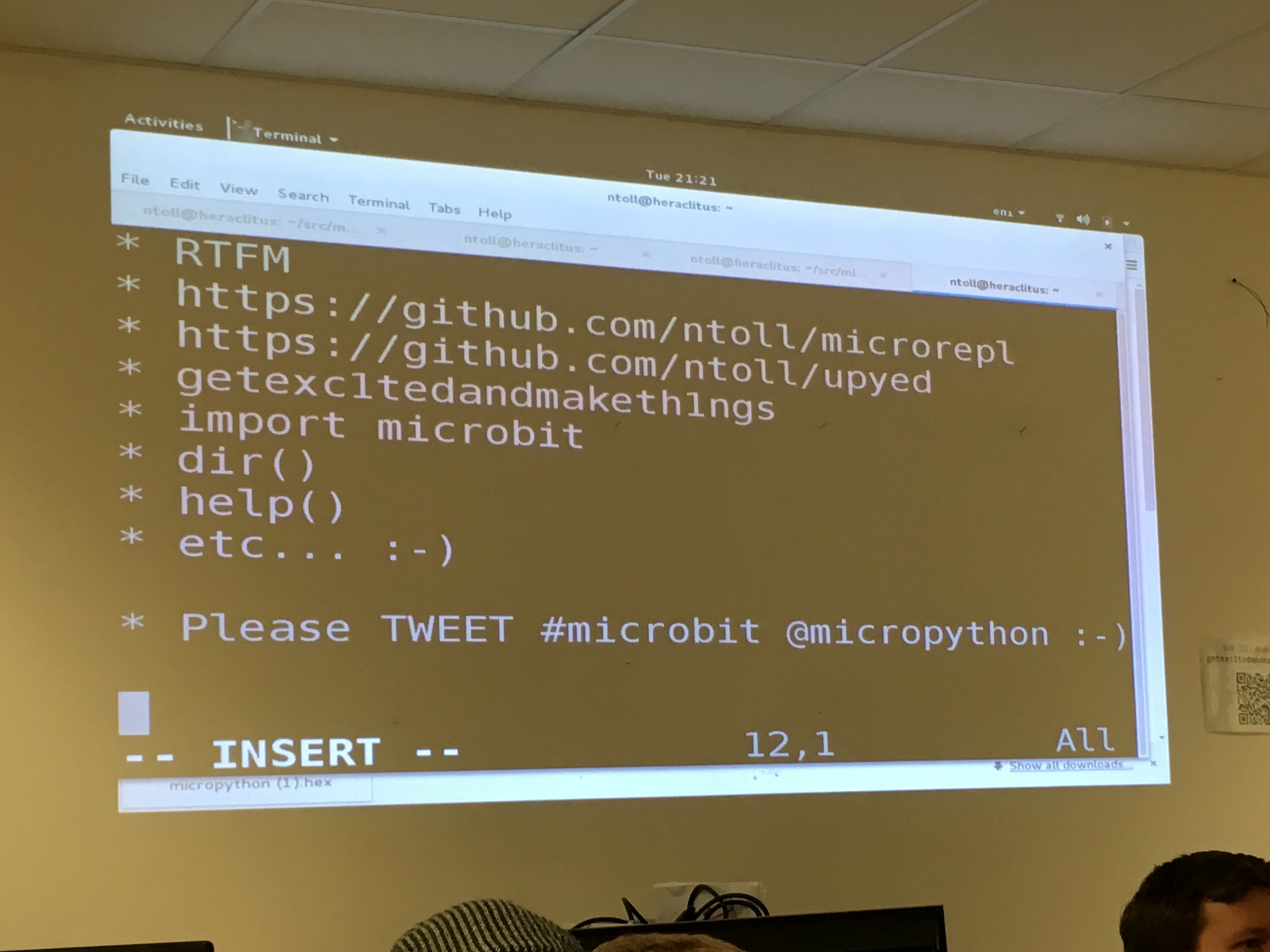
<p><a href="https://www.diegor.it/assets/images/IMG_6734.jpg"><img src="https://www.diegor.it/assets/images/IMG_6734.jpg" alt="IMG_6734" class="align-center" /></a></p>

<p>micro:bit is a board that BBC will distribute to every year 7 student in the
UK (early 2016, roughly 1 million units) and it will be shipped with
<a href="https://micropython.org">micropython</a> on it (<a href="http://www.arm.com/innovation/products/microbit.php">more
info</a>). Hardware specs
can be found <a href="https://www.microbit.co.uk/device">here</a>: it has a Cortex-M0,
compass, accelerometer, 5x5 leds, bluetooth, uart, i2c, two buttons and other
stuff you can use.</p>

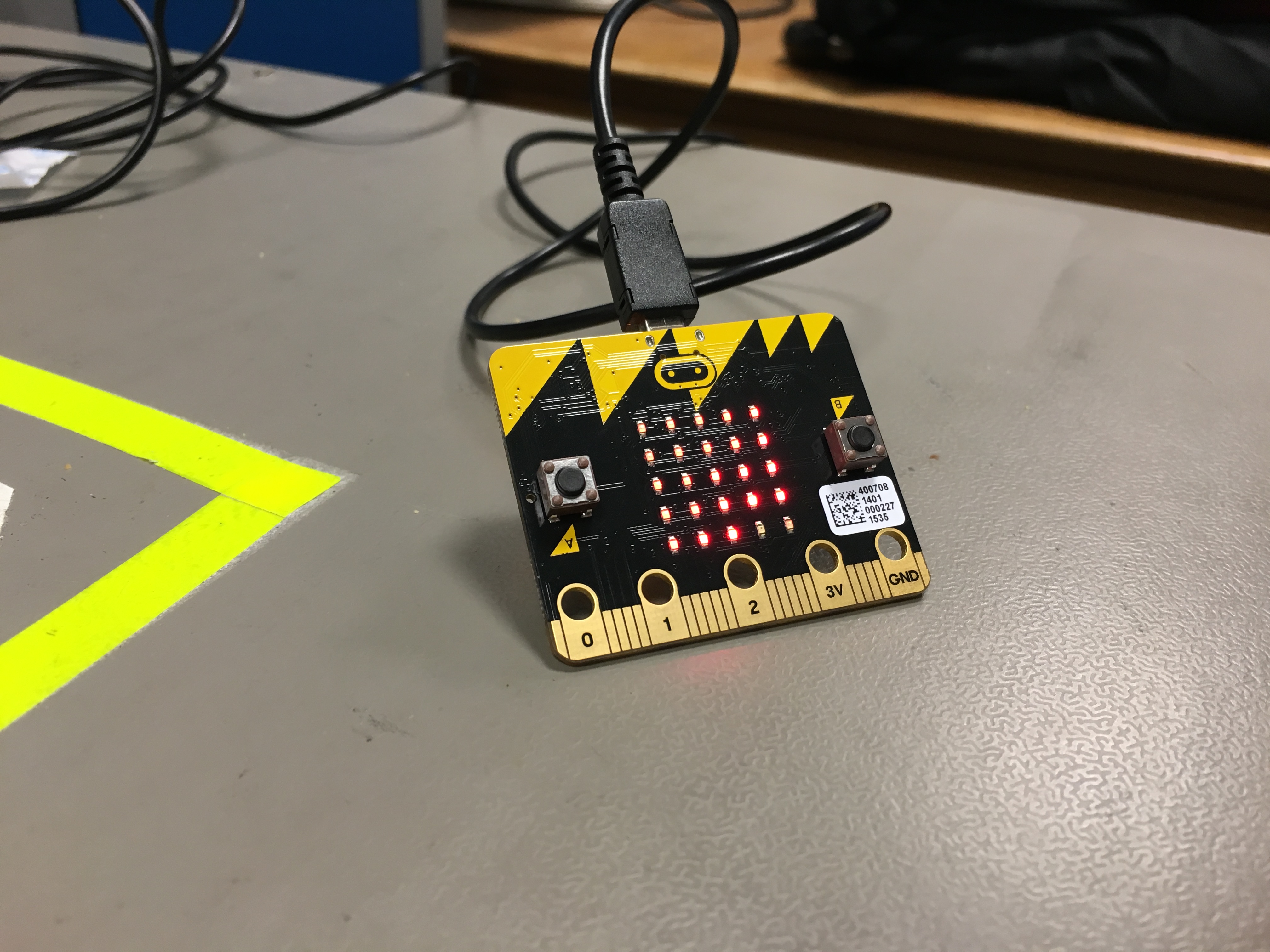
<p><a href="https://www.diegor.it/assets/images/IMG_6731.jpg"><img src="https://www.diegor.it/assets/images/IMG_6731.jpg" alt="IMG_6731" class="align-center" /></a></p>

<p>In a such tiny little board you can run python… well
<a href="https://micropython.org">micropython</a>, a fast implementation of <a href="http://www.python.org/">Python
3</a> programming language that is optimised to run on a
microcontroller.</p>

<p>So, what did we do? Once plugged the micro:bit to the USB, we can run python
code through <a href="https://github.com/ntoll/microrepl">microrepl</a>, a script that
lets you run commands directly onto a connected micro:bit device.
Alternatively you can use the <a href="https://github.com/ntoll/upyed">browser based micro:bit
editor</a>, and start programming directly in
your browser. Very neat!</p>

<p>My group (Gareth and myself), after exploring, experimenting, and testing the
APIs, decided to do something with the 5x5 leds available. This is the code we
have written literllay in few minutes:</p>

<div class="language-python highlighter-rouge"><div class="highlight"><pre class="highlight"><code><span class="kn">import</span> <span class="nn">microbit</span>     


<span class="c1"># It returns the brightness (0-9) depending on the position of the led  
</span><span class="k">def</span> <span class="nf">brightness</span><span class="p">(</span><span class="n">x</span><span class="p">,</span> <span class="n">y</span><span class="p">,</span> <span class="n">t</span><span class="p">):</span>  
    <span class="k">return</span> <span class="p">(</span><span class="n">x</span> <span class="o">+</span> <span class="n">y</span> <span class="o">+</span> <span class="n">t</span><span class="p">)</span> <span class="o">%</span> <span class="mi">10</span>


<span class="c1"># Iterate the whole led matrix and set the pixel with the right brightness  
</span><span class="k">def</span> <span class="nf">get_image</span><span class="p">(</span><span class="n">t</span><span class="p">):</span>  
    <span class="k">for</span> <span class="n">x</span> <span class="ow">in</span> <span class="nb">range</span><span class="p">(</span><span class="mi">0</span><span class="p">,</span> <span class="mi">5</span><span class="p">):</span>  
        <span class="k">for</span> <span class="n">y</span> <span class="ow">in</span> <span class="nb">range</span><span class="p">(</span><span class="mi">0</span><span class="p">,</span> <span class="mi">5</span><span class="p">):</span>  
            <span class="n">microbit</span><span class="p">.</span><span class="n">display</span><span class="p">.</span><span class="n">set_pixel</span><span class="p">(</span><span class="n">x</span><span class="p">,</span><span class="n">y</span><span class="p">,</span> <span class="n">brightness</span><span class="p">(</span><span class="n">x</span><span class="p">,</span><span class="n">y</span><span class="p">,</span><span class="n">t</span><span class="p">))</span>                           


<span class="n">t</span> <span class="o">=</span> <span class="mi">0</span>  <span class="c1"># time  
</span><span class="n">a</span> <span class="o">=</span> <span class="mi">1</span>  <span class="c1"># direction flag
</span>

<span class="c1"># Start looping  
</span><span class="k">while</span> <span class="bp">True</span><span class="p">:</span>  
    <span class="n">get_image</span><span class="p">(</span><span class="n">t</span><span class="p">)</span>  <span class="c1"># Set all the leds  
</span>    <span class="n">t</span> <span class="o">+=</span> <span class="n">a</span>  <span class="c1"># Incrementing t  
</span>    <span class="n">microbit</span><span class="p">.</span><span class="n">sleep</span><span class="p">(</span><span class="mi">100</span><span class="p">)</span>  <span class="c1"># Let's wait some time  
</span>    <span class="k">if</span> <span class="n">microbit</span><span class="p">.</span><span class="n">button_a</span><span class="p">.</span><span class="n">is_pressed</span><span class="p">():</span>  <span class="c1">#Check if the user presses the button  
</span>        <span class="n">a</span> <span class="o">*=</span> <span class="o">-</span><span class="mi">1</span>  <span class="c1"># Revert the direction  
</span></code></pre></div></div>

<p>This is what it does (in real time the effect is much better):</p>
<iframe width="560" height="315" src="https://www.youtube.com/embed/uUY6GCazcFQ" frameborder="0" allowfullscreen=""></iframe>

<p>And this is the slow motion:</p>
<iframe width="560" height="315" src="https://www.youtube.com/embed/Nvdc0jZPLb4" frameborder="0" allowfullscreen=""></iframe>

<p>When the user presses the button, it changes direction.
It has been very good fun and I’m sure kids will love it: it is
straightforward to use it, pretty intuitive and microrepl is very easy to use
(it has autocompletion!)</p>]]></content><author><name>Diego Russo</name><email>me@diegor.it</email></author><category term="personal" /><category term="english" /><category term="microbit" /><category term="micropython" /><summary type="html"><![CDATA[Last night I attended the usual CamPUG monthly meeting and the main topic was about micro:bit and micropython.]]></summary></entry><entry><title type="html">On El Capitan, bash, and history</title><link href="https://www.diegor.it/2015/07/13/on-el-capitan-bash-and-history/" rel="alternate" type="text/html" title="On El Capitan, bash, and history" /><published>2015-07-13T00:00:00+01:00</published><updated>2015-07-13T00:00:00+01:00</updated><id>https://www.diegor.it/2015/07/13/on-el-capitan-bash-and-history</id><content type="html" xml:base="https://www.diegor.it/2015/07/13/on-el-capitan-bash-and-history/"><![CDATA[<p>As explained in this <a href="http://www.reddit.com/r/osx/comments/397uep/changes_to_bash_sessions_and_terminal_in_el/">reddit</a>,
Apple made some changed for bash users especially on saving bash sessions/history.
Whenever a user exits, it saves the history in <code class="language-plaintext highlighter-rouge">~/.bash_sessions/</code> directory.
Until here, nothing strage until you don’t play with <code class="language-plaintext highlighter-rouge">HISTFILESIZE</code> and <code class="language-plaintext highlighter-rouge">HISTSIZE</code>
environment variables.</p>

<p>In <code class="language-plaintext highlighter-rouge">/etc/bash_bashrc_Apple_Terminal</code> (which is called by <code class="language-plaintext highlighter-rouge">/etc/bashrc</code>), the
following piece of code can cause some issues when you have set <code class="language-plaintext highlighter-rouge">HISTFILESIZE</code>
and <code class="language-plaintext highlighter-rouge">HISTSIZE</code> to a very high values:</p>

<div class="language-plaintext highlighter-rouge"><div class="highlight"><pre class="highlight"><code># Save new history commands.  
if [ $BASH_SESSION_HISTORY -eq 1 ]; then  
    history -a  
    cat "$BASH_SESSION_HISTFILE_NEW" &gt;&gt; "$BASH_SHARED_HISTFILE"  
    cat "$BASH_SESSION_HISTFILE_NEW" &gt;&gt; "$BASH_SESSION_HISTFILE"  

    # Empty this session's history file to keep track of  
    # which commands have already been copied.  
    : &gt;| "$BASH_SESSION_HISTFILE_NEW"

    # Read/write the files via the history command so they  
    # are truncated as appropriate.  
    history -r "$BASH_SHARED_HISTFILE"  
    history -w "$BASH_SHARED_HISTFILE"  
    history -r "$BASH_SESSION_HISTFILE"  
    history -w "$BASH_SESSION_HISTFILE"  
fi  
</code></pre></div></div>

<p>I had the <code class="language-plaintext highlighter-rouge">HIST*</code> variables set as:</p>

<div class="language-plaintext highlighter-rouge"><div class="highlight"><pre class="highlight"><code>HISTFILESIZE=1000000000  
HISTSIZE=1000000
</code></pre></div></div>

<p>and this is what happened when I logout from the shell.</p>

<div class="language-plaintext highlighter-rouge"><div class="highlight"><pre class="highlight"><code>leonard:~ diegor$ logout  
+ bash_update_session_state  
+ bash_save_session_state  
+ '[' 1 -eq 1 ']'  
+ '[' -n /Users/diegor/.bash_sessions/97360883-85FB-4463-A9DF-1246FCD05977.session ']'  
+ echo -n Saving session...  
Saving session...++ date  
+ echo echo Restored session: Mon Jul 13 08:23:07 BST 2015  
+ declare -F bash_session_save_state  
+ '[' 1 -eq 1 ']'  
+ history -a  
+ cat /Users/diegor/.bash_sessions/97360883-85FB-4463-A9DF-1246FCD05977.historynew  
+ :  
+ history -r /Users/diegor/.bash_history  
</code></pre></div></div>

<p>Looking at the help of history, it is stated:</p>

<div class="language-plaintext highlighter-rouge"><div class="highlight"><pre class="highlight"><code>The `-w' option writes out the current history to the history file;  
`-r' means to read the file and append the contents to the history list instead.
</code></pre></div></div>

<p>which means: if you <code class="language-plaintext highlighter-rouge">HIST*</code> size are very high, the size is going to grow a lot,
with some implications (see three bullet points below)</p>

<p>At this point you observe the following things:</p>

<ul>
  <li>the terminal is stuck on <code class="language-plaintext highlighter-rouge">Saving session...</code></li>
  <li>CPU usage goes high (you have to kill the bash process from another shell or System Monitor)</li>
  <li>the size of <code class="language-plaintext highlighter-rouge">~/.bash_session</code> is increasing overtime: every time you logout it increases by the size of the history file (in my case was 20MB)</li>
</ul>

<p>My suggestion is <strong>NOT to set those variables</strong> and let OSX deal with them.</p>

<p>IHTH</p>]]></content><author><name>Diego Russo</name><email>me@diegor.it</email></author><category term="howto" /><category term="english" /><category term="osx" /><category term="bash" /><summary type="html"><![CDATA[As explained in this reddit, Apple made some changed for bash users especially on saving bash sessions/history. Whenever a user exits, it saves the history in ~/.bash_sessions/ directory. Until here, nothing strage until you don’t play with HISTFILESIZE and HISTSIZE environment variables.]]></summary></entry><entry><title type="html">Dual boot with Windows 8.1 and Linux on HP/Sony laptops</title><link href="https://www.diegor.it/2015/06/09/dual-boot-with-windows-8-1-and-linux-on-hpsony-laptops/" rel="alternate" type="text/html" title="Dual boot with Windows 8.1 and Linux on HP/Sony laptops" /><published>2015-06-09T00:00:00+01:00</published><updated>2015-06-09T00:00:00+01:00</updated><id>https://www.diegor.it/2015/06/09/dual-boot-with-windows-8-1-and-linux-on-hpsony-laptops</id><content type="html" xml:base="https://www.diegor.it/2015/06/09/dual-boot-with-windows-8-1-and-linux-on-hpsony-laptops/"><![CDATA[<p>Branded laptops (e.g. HP, Sony, etc) don’t boot Linux. Just Windows. Yes, you
got it. <strong>Just Windows</strong>. You can try installing Linux but it won’t be added
to the boot manager. You can also try to configure GRUB as boot manager, but
this will be overwritten by the Windows boot manager. Unfortunately there is
no unique solution and every brand can adopt different strategies: googling
around I’ve read that sometime the boot manager just boots entries where the
name starts with Windows. Crazy!<br />
Everything started when my niece told me that Ubuntu wasn’t started anymore on
her HP Pavillon. I said: <em>“No problem, it’s a piece of cake”</em>. At the time I
installed Ubuntu she had Windows 8 and now she has Windows 8.1. This rang a
bell. Maybe the update overwrote the UEFI configuration. Ok, it might be
possible.<br />
I downloaded <a href="https://neosmart.net/EasyBCD/">EasyBCD</a> trying to add Ubuntu. It
was kind of done but every time I rebooted the machine I couldn’t see the
entry (I was using the Windows Boot Manager). I tried tens of times, every
possible combination. I’ve played with
<a href="https://technet.microsoft.com/en-GB/library/cc709667\(v=ws.10\).aspx">bcdedit.exe</a>
under Windows, with <a href="http://linux.die.net/man/8/efibootmgr">efibootmanager</a>
under Linux, I’ve installed rEFInd but I had no luck at all. <a href="http://askubuntu.com/questions/452071/why-disable-fast-boot-on-windows-8-when-having-dual-booting">I’ve even disabled the fast boot
on Windows 8.1.</a></p>

<p><strong>Nothing, nada, tabula rasa.</strong></p>

<p>I couldn’t boot to Linux unless I went to the kind of BIOS menu and selected
the Linux partition. After spending few days after this, I bumped into this
<a href="http://askubuntu.com/questions/486752/dual-boot-win-8-ubuntu-loads-only-win/486789#comment650733_486789">comment</a>
in a stackoverflow post. It states:</p>

<p><em>“Yes! Renaming worked for me! I mounted the efi partition and copied the
files ../EFI/ubuntu/grubx64.efi to ../EFI/Boot/ and to /EFI/Microsoft/Boot and
changed the name of the file as follows. In the ../EFI/Boot directory I
overwrote the bootx64.efi with the file and in the ../EFI/Microsoft/Boot I
overwrote the bootmgfw.efi with the file. That was all I think. Thank you very
much! - user296880 Jun 23 ‘14 at 20:28”</em></p>

<p>Well user296880, it did work for me too! <strong>Renaming file under the hood is
really the last resort</strong>. A new upgrade might wipe everything and have to
start again but I accept the risk.</p>

<p>Searching a bit better I also bumped into <a href="http://askubuntu.com/a/381741">this other
post</a> which explains <strong>exactly</strong> my situation.</p>

<p>Said that, really good luck with that.</p>]]></content><author><name>Diego Russo</name><email>me@diegor.it</email></author><category term="howto" /><category term="english" /><category term="windows" /><category term="ubuntu" /><category term="dual boot" /><category term="UEFI" /><summary type="html"><![CDATA[Branded laptops (e.g. HP, Sony, etc) don’t boot Linux. Just Windows. Yes, you got it. Just Windows. You can try installing Linux but it won’t be added to the boot manager. You can also try to configure GRUB as boot manager, but this will be overwritten by the Windows boot manager. Unfortunately there is no unique solution and every brand can adopt different strategies: googling around I’ve read that sometime the boot manager just boots entries where the name starts with Windows. Crazy! Everything started when my niece told me that Ubuntu wasn’t started anymore on her HP Pavillon. I said: “No problem, it’s a piece of cake”. At the time I installed Ubuntu she had Windows 8 and now she has Windows 8.1. This rang a bell. Maybe the update overwrote the UEFI configuration. Ok, it might be possible. I downloaded EasyBCD trying to add Ubuntu. It was kind of done but every time I rebooted the machine I couldn’t see the entry (I was using the Windows Boot Manager). I tried tens of times, every possible combination. I’ve played with bcdedit.exe under Windows, with efibootmanager under Linux, I’ve installed rEFInd but I had no luck at all. I’ve even disabled the fast boot on Windows 8.1.]]></summary></entry><entry><title type="html">HOWTO: Change the message of a pushed commit</title><link href="https://www.diegor.it/2015/05/09/howto-change-the-message-of-a-pushed-commit/" rel="alternate" type="text/html" title="HOWTO: Change the message of a pushed commit" /><published>2015-05-09T00:00:00+01:00</published><updated>2015-05-09T00:00:00+01:00</updated><id>https://www.diegor.it/2015/05/09/howto-change-the-message-of-a-pushed-commit</id><content type="html" xml:base="https://www.diegor.it/2015/05/09/howto-change-the-message-of-a-pushed-commit/"><![CDATA[<ul>
  <li><code class="language-plaintext highlighter-rouge">git rebase -i</code></li>
  <li>In you editor now change <code class="language-plaintext highlighter-rouge">pick</code> to <code class="language-plaintext highlighter-rouge">reword</code> on the line for the incorrect commit.</li>
  <li>Once you have done, save and close.</li>
  <li>Now the editor opens again with the message to correct. Do your correction, save and close</li>
  <li><code class="language-plaintext highlighter-rouge">git push --force</code></li>
</ul>

<p>This method will rewrite the history of your repository. If someone
pulled/fetched from the repo between the commit with the wrong message and
when you correct it, he/she could have some issues. It would be useful to
communicate to anyone involved about your action.</p>]]></content><author><name>Diego Russo</name><email>me@diegor.it</email></author><category term="howto" /><category term="english" /><category term="git" /><category term="job" /><summary type="html"><![CDATA[git rebase -i In you editor now change pick to reword on the line for the incorrect commit. Once you have done, save and close. Now the editor opens again with the message to correct. Do your correction, save and close git push --force This method will rewrite the history of your repository. If someone pulled/fetched from the repo between the commit with the wrong message and when you correct it, he/she could have some issues. It would be useful to communicate to anyone involved about your action.]]></summary></entry><entry><title type="html">My CV on github</title><link href="https://www.diegor.it/2015/03/27/my-cv-on-github/" rel="alternate" type="text/html" title="My CV on github" /><published>2015-03-27T00:00:00+00:00</published><updated>2015-03-27T00:00:00+00:00</updated><id>https://www.diegor.it/2015/03/27/my-cv-on-github</id><content type="html" xml:base="https://www.diegor.it/2015/03/27/my-cv-on-github/"><![CDATA[<p>I’ve always had my CV versioned. In the early days I used svn and then I moved
to git. I had my own private repository but recently I have decided to move it
to github. It is written in LaTeX and it uses ModernCV classes.<br />
You can get the pdf from my website/github or you can fork my repo to create
your own CV starting from <a href="http://github.com/diegorusso/cv">http://github.com/diegorusso/cv</a></p>]]></content><author><name>Diego Russo</name><email>me@diegor.it</email></author><category term="personal" /><category term="english" /><category term="git" /><category term="latex" /><category term="cv" /><summary type="html"><![CDATA[I’ve always had my CV versioned. In the early days I used svn and then I moved to git. I had my own private repository but recently I have decided to move it to github. It is written in LaTeX and it uses ModernCV classes. You can get the pdf from my website/github or you can fork my repo to create your own CV starting from http://github.com/diegorusso/cv]]></summary></entry><entry><title type="html">HOWTO: Ctrl/Alt/Shift keys not working in VMWare</title><link href="https://www.diegor.it/2014/10/05/howto-ctrlaltshift-keys-not-working-in-vmware/" rel="alternate" type="text/html" title="HOWTO: Ctrl/Alt/Shift keys not working in VMWare" /><published>2014-10-05T00:00:00+01:00</published><updated>2014-10-05T00:00:00+01:00</updated><id>https://www.diegor.it/2014/10/05/howto-ctrlaltshift-keys-not-working-in-vmware</id><content type="html" xml:base="https://www.diegor.it/2014/10/05/howto-ctrlaltshift-keys-not-working-in-vmware/"><![CDATA[<p>Sometime when using VMWare under linux, it makes impossible the usage of
Ctrl/Alt/Shift keys on the virtualised OS. The solution is quite easy though.
Open a terminal and type the following command:</p>

<div class="language-plaintext highlighter-rouge"><div class="highlight"><pre class="highlight"><code>$ setxkbmap
</code></pre></div></div>

<p>That’s it.</p>]]></content><author><name>Diego Russo</name><email>me@diegor.it</email></author><category term="howto" /><category term="english" /><category term="linux" /><category term="vmware" /><summary type="html"><![CDATA[Sometime when using VMWare under linux, it makes impossible the usage of Ctrl/Alt/Shift keys on the virtualised OS. The solution is quite easy though. Open a terminal and type the following command:]]></summary></entry><entry><title type="html">HOWTO: check if I am in a screen session</title><link href="https://www.diegor.it/2014/08/28/howto-check-if-i-am-in-a-screen-session/" rel="alternate" type="text/html" title="HOWTO: check if I am in a screen session" /><published>2014-08-28T00:00:00+01:00</published><updated>2014-08-28T00:00:00+01:00</updated><id>https://www.diegor.it/2014/08/28/howto-check-if-i-am-in-a-screen-session</id><content type="html" xml:base="https://www.diegor.it/2014/08/28/howto-check-if-i-am-in-a-screen-session/"><![CDATA[<div class="language-plaintext highlighter-rouge"><div class="highlight"><pre class="highlight"><code>$ echo $STY
</code></pre></div></div>

<p>If you are in a screen session, you’ll see something similar to</p>

<div class="language-plaintext highlighter-rouge"><div class="highlight"><pre class="highlight"><code>$ echo $STY  
5413.ttys001.leonard
</code></pre></div></div>

<p>If you aren’t, you’ll see nothing.</p>

<div class="language-plaintext highlighter-rouge"><div class="highlight"><pre class="highlight"><code>$ echo $STY

$
</code></pre></div></div>]]></content><author><name>Diego Russo</name><email>me@diegor.it</email></author><category term="howto" /><category term="english" /><category term="linux" /><category term="screen" /><category term="job" /><summary type="html"><![CDATA[$ echo $STY]]></summary></entry></feed>